How to Find Outlier Videos on YouTube: A Practical Guide
Learn how to find outlier videos on YouTube, compare channel baselines, avoid misleading signals, and turn standout videos into original thumbnail ideas.
Thumbrix Editorial · Published · 9 min read
To find outlier videos on YouTube, look for videos that earn substantially more views than their channel usually gets. Start with channels in your niche, identify unusually strong uploads, and compare them with similar videos published around the same time. Then look for patterns worth exploring in your own content.
Try the free YouTube Outlier Finder to compare uploads and start your own thumbnail brief, or follow the manual steps below.
What is an outlier video on YouTube?
An outlier video performs unusually well compared with its channel's normal results.
Imagine a channel whose comparable videos typically receive around 5,000 views. An upload reaching 50,000 views would be worth investigating. A 50,000-view upload on a channel that regularly gets 500,000 views tells a different story.
The comparison is relative to the channel's usual performance. That is also how vidIQ describes outliers: videos receiving more views than a channel normally gets.
Subscriber count is misleading more often than helpful. A channel with 500K subs and 3K views per video has a dead audience; a channel with 8K subs getting 40K views is riding search or recommendations hard. Look at views, not the number on the badge.
An outlier gives you a research lead—a question worth digging into, not a blueprint to copy.
How to find outlier videos on YouTube for free
You need a focused topic, a small set of relevant channels, and somewhere to record your findings.
1. Start with a specific audience or problem
Broad categories produce messy comparisons. “Technology” includes phone reviews, programming tutorials, documentaries, and entertainment. Choose something narrower:
- Budget microphones for home recording.
- Minecraft survival builds for beginners.
- Quick meals for people cooking alone.
- Small-space desk setups.
Search several phrases that the intended viewer might use. For microphones, try “USB microphone background noise,” “cheap microphone test,” and “microphone for untreated room.” Find channels serving a similar audience, even when their subscriber counts differ.
2. Build a short channel list
Start with five to ten channels. This is a manageable research sample, not a statistical requirement.
Prioritize channels with enough relevant uploads to establish normal performance. A channel with only two videos offers little basis for comparison.
Keep long-form videos, Shorts, and livestreams separate. They have different viewing contexts, so combining them can make your baseline less useful. Record each channel's main subject and format to recognize departures from its usual content.
3. Use popular uploads to discover candidates
Open a channel's Videos tab and use the Popular sort, where available, to spot uploads that stand above the rest.
Then check recent uploads. An older video may lead the channel because it has accumulated search traffic for years. A newer video may be unusually strong without appearing near the top of the all-time list.
For each candidate, note its title, URL, publication date, current views, format, and approximate length. Include the date you recorded those views.
4. Build a comparable baseline
Collect roughly ten relevant uploads from the same channel, excluding the candidate from its own comparison group.
Choose similar formats and reasonably close publication dates. If the channel changed direction recently, use the relevant period rather than its entire history. Avoid quietly removing ordinary low-performing uploads: that would distort the baseline.
Comparing a two-year-old upload with videos published last week gives the older video much more time to collect views. For your own channel, compare equivalent periods after publication when those analytics are available.
For another channel, current public counts often allow only an approximate comparison. Record that limitation. If there are too few comparable uploads, keep the video as an interesting candidate without assigning a confident multiplier.
5. Look for repetition across channels
Search for other videos addressing the same viewer need or using a similar format. If a budget microphone comparison performs unusually well, check whether independent channels also have strong results for affordable equipment tests.
Look beyond matching title words. The shared pattern might be testing a cheaper alternative, resolving a buying decision, or showing a surprising before-and-after result.
Repeated results can make an idea more interesting to investigate. They still do not prove the cause, and they may signal growing competition.
How to calculate a useful outlier ratio
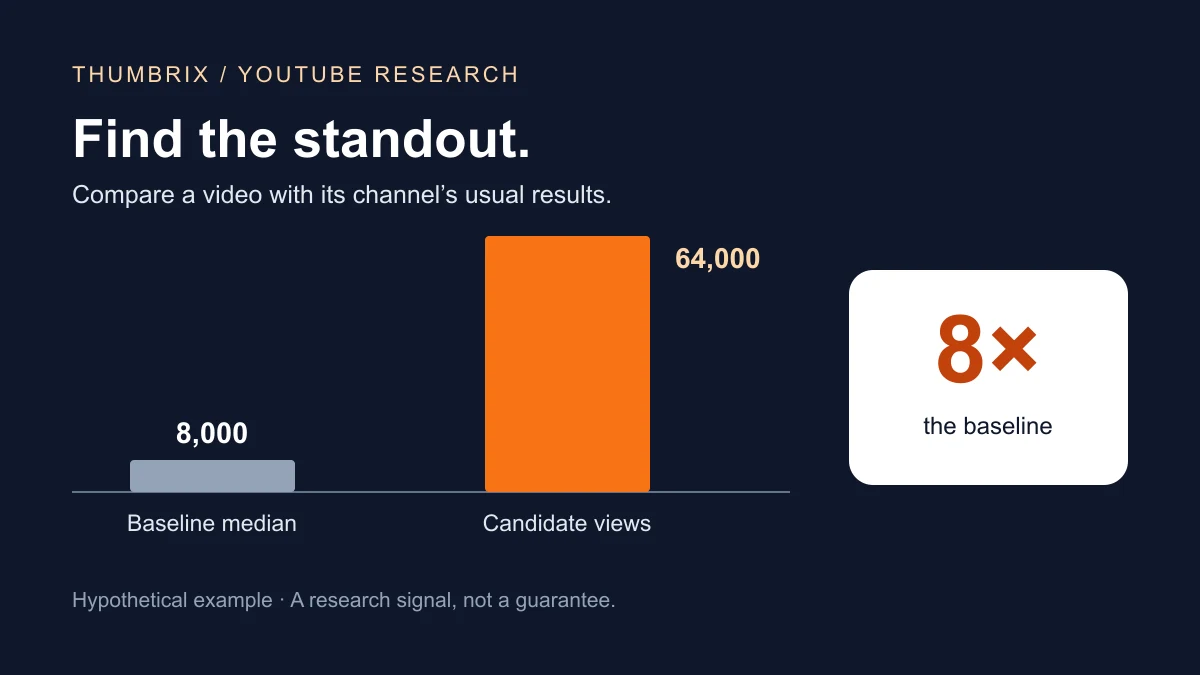
A hypothetical example: compare the candidate with a relevant channel baseline.
For manual research, a simple starting point is:
Outlier ratio = candidate video views ÷ median views of comparable uploads
The median is the middle value in a sorted list. It helps prevent one exceptionally large video from pulling the baseline upward.
Here is a hypothetical comparison group of ten videos:
| Comparable upload | Views |
|---|---|
| 1 | 4,000 |
| 2 | 5,000 |
| 3 | 6,000 |
| 4 | 7,000 |
| 5 | 8,000 |
| 6 | 8,000 |
| 7 | 9,000 |
| 8 | 10,000 |
| 9 | 12,000 |
| 10 | 30,000 |
The two middle values are both 8,000, so the median is 8,000 views. If the candidate has 64,000 views:
64,000 ÷ 8,000 = 8×
Under this method, the candidate has eight times the comparison group's median views.
You might flag videos at 3× or higher for an initial review. That is a practical screening choice, not an official YouTube threshold or proof of statistical significance.
This calculation is not a universal formula for third-party tools. Different products may use different samples, averages, or adjustments.
A multiplier does not correct a poor comparison. Check video age, format, and channel changes before interpreting it. A zero or tiny baseline can produce an undefined or exaggerated ratio; inspect the underlying counts instead.
How to find outliers faster with tools
The Thumbrix YouTube Outlier Finder compares recent channel uploads, exposes its baseline, and connects useful references to your creative brief. Detection uses no AI Credits.
vidIQ provides an Outliers research feature with information such as view counts, publication dates, outlier scores, and views per hour. Its official documentation notes that advanced filters require a paid plan. Check the vidIQ Outliers guide for current access details.
1of10 offers outlier discovery as part of its video research workflow. Its guide to finding high-performing videos explains using relative performance to identify videos for further study.
Whichever tool you use, review the underlying video and channel. Is it relevant to your viewer? How old is it? What does the score compare? Is the opportunity still relevant today?
An automated score helps prioritize attention. Your research determines whether the example belongs in your content plan.
Which outlier videos are worth studying?
A large multiplier is only one part of the decision.
Check audience fit
Would someone who enjoyed this video plausibly watch yours? A celebrity studio tour and a beginner desk-setup tutorial might share visual elements while serving different interests. Write down the viewer's reason to care before analyzing the thumbnail.
Consider timing and unusual circumstances
A release announcement, news event, collaboration, or unusual subject can affect performance. Some factors are visible; others, such as the exact traffic mix, may remain unknown. Treat them as possible explanations rather than confirmed causes.
Separate observations from explanations
“The thumbnail shows two products with a large price difference” is an observation. “The price difference caused the video to get more views” is an explanation that public view counts cannot establish.
High views do not reveal a competitor's CTR or audience retention unless the creator has shared those analytics. YouTube explains that CTR varies with audience and traffic source, making context essential even when you have the numbers.
Check what you can contribute
Your video might add a more relevant test, newer information, clearer instructions, a different budget, or firsthand experience. If your only contribution is recreating an existing title and image, return to the research stage.
Turn an outlier into an original title and thumbnail
Consider a hypothetical video titled “Can a $30 Microphone Beat a $300 Microphone?” Its thumbnail places both microphones side by side with large price labels.
The visible structure includes a buying decision, a price contrast, and an unresolved outcome. Study that structure without copying the products, wording, or composition.
Identify the promise and choose your test
Describe what the viewer expects to learn: Will spending more solve the problem I actually have?
For a home-recording audience, your original angle could be “Which Budget Mic Handles a Noisy Room Best?” Test a specific problem under consistent conditions. The value comes from the test and explanation, not just the packaging.
Develop distinct thumbnail directions
| Direction | Visual idea | Viewer question |
|---|---|---|
| Environment | Microphone beside a visible source of room noise | Will this work in my room? |
| Comparison | Two tested microphones with a short “NOISY ROOM TEST” label | Which handles noise better? |
| Result | The actual setup with a clear, truthful result cue | What did the test reveal? |
Use real products and accurate claims. Avoid implying a result your video does not demonstrate.
Thumbrix can help turn these visual directions into thumbnail concepts. Start with the audience, the promise, and what must appear in the image. For composition guidance, see how to make a good YouTube thumbnail and how to choose thumbnail colors.
Validate with your own viewers
Treat thumbnail ideas as hypotheses. For eligible videos, YouTube's Test & Compare feature compares thumbnails using viewer data and evaluates results through watch time share, rather than clicks alone.
A design review can catch unreadable text or unclear composition. It does not replace an audience experiment. After publishing, review views, impressions, CTR, and average view duration in context. YouTube's content analytics guide explains these measures.
A simple outlier research worksheet
Use one row per candidate in your spreadsheet:
| Field | What to record |
|---|---|
| Video and channel | Title, URL, and channel name |
| Observation date | When you checked the numbers |
| Publication date | How long the video has been available |
| Format | Long-form, Short, or livestream |
| Current views | The public count you observed |
| Comparison group | Which uploads you used and why |
| Baseline and ratio | Median views and candidate multiplier |
| Viewer promise | The question or outcome being offered |
| Thumbnail observation | What is visibly present |
| Uncertainties | Timing, collaboration, age differences, missing data |
| Original angle | What you could contribute |
| Decision | Study further, develop, or skip |
Frequently asked questions about YouTube outliers
Can I find YouTube outlier videos for free?
Yes. Use YouTube search and channel pages to find candidates, then record views and calculate a baseline in a spreadsheet. The main cost is research time.
What is a good YouTube outlier score?
There is no universal threshold. For this guide's manual method, 3× can be an initial screening point. Check the baseline, age, and relevance before deciding.
Can small channels have outlier videos?
Yes. A modest view count can substantially outperform a channel's usual results. Be cautious when the channel has very few uploads or a tiny baseline.
Should I compare Shorts with long-form videos?
Keep them in separate research groups. Compare candidates with videos that have similar formats and viewing contexts.
Does an outlier prove the thumbnail worked?
No. Public views show the outcome, not each factor's contribution. Study the title and thumbnail as possible explanations, then test your ideas with your audience.